
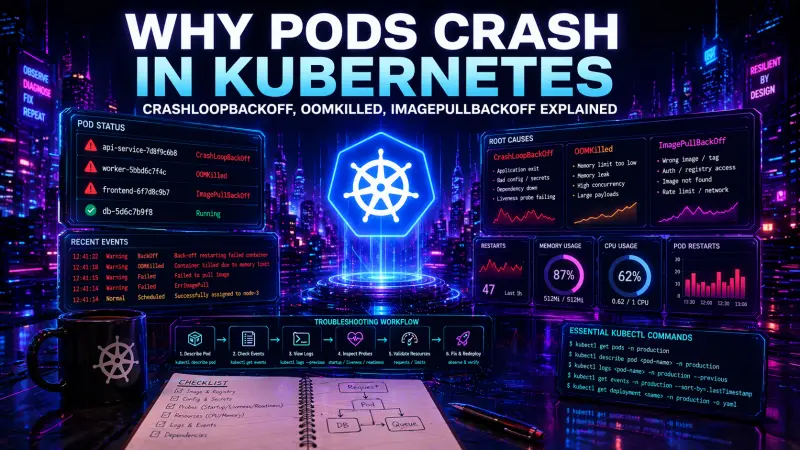
Kubernetes rarely tells you the root cause directly in the pod status. CrashLoopBackOff, OOMKilled, and ImagePullBackOff are symptoms of different failure points in the pod lifecycle. Treating them as final answers is one of the most common debugging mistakes in production clusters.
The practical goal is not to memorize every status string. The goal is to identify where the failure happens: before the container starts, while the process is running, during health checks, or under resource pressure. Once you know that, the right kubectl commands become obvious.
Pod status is a signal, not a diagnosis
A pod can fail for many reasons, but the investigation usually starts with three questions:
Did Kubernetes manage to pull the image?
Did the container process start and stay alive?
Did the kubelet restart or kill it because of health checks or resource limits?
The same application can move through several states during one incident. For example, a bad deployment may first show ImagePullBackOff because the image tag is wrong. After the tag is fixed, the pod may enter CrashLoopBackOff because the app cannot connect to a required secret. After that, it may become OOMKilled under real traffic because memory limits are too low.
That is why the first step is always to inspect the pod, not to assume the reason from the status column.
kubectl get pods -n production

kubectl describe pod api-7f9d8c6d5b-k2xpl -n production

kubectl get events -n production \
  --sort-by=.lastTimestamp
kubectl get pods gives you the symptom. kubectl describe pod gives you container state, restart count, probe failures, scheduling issues, image pull errors, and recent events. kubectl get events shows what Kubernetes tried to do and what failed.
A decision table for common pod failures
Symptom | Failure point | What to inspect first | Common causes | Production risk |
|---|---|---|---|---|
ImagePullBackOff | Before container start | Events, image name, registry auth | Wrong tag, missing image, expired credentials, private registry access | New rollout cannot start |
CrashLoopBackOff | After container start | Previous logs, exit code, env, config, probes | App exits, failed boot, missing config, bad migration, failing liveness probe | Repeated restarts, unstable service |
OOMKilled | Runtime under memory pressure | Last state, memory limits, metrics, traffic pattern | Limit too low, memory leak, large request payloads, unbounded cache | Process killed, data loss risk for in-memory work |
CreateContainerConfigError | Container configuration | Secrets, ConfigMaps, env references | Missing key, invalid volume mount, bad envFrom source | Pod never starts |
Pending | Scheduling | Node capacity, taints, affinity, PVCs | Insufficient CPU or memory, unsatisfied node selector, unbound volume | Capacity or placement issue |
The table is useful because it separates lifecycle phases. Debugging an image pull problem with application logs wastes time because the application has not started. Debugging an OOM kill only through readiness probes misses the memory pressure that caused the restart.
CrashLoopBackOff: the app starts, then exits or gets restarted
CrashLoopBackOff means Kubernetes has repeatedly restarted a container and is backing off before trying again. It does not tell you why the container exited. The cause is usually inside the process, its configuration, or the health check behavior.
Start with the current and previous logs:
kubectl logs api-7f9d8c6d5b-k2xpl -n production

kubectl logs api-7f9d8c6d5b-k2xpl -n production --previous

kubectl describe pod api-7f9d8c6d5b-k2xpl -n production
--previous matters because the current container instance may have only just started. The useful error often belongs to the container that already crashed.
Look for:
exit codes in
Last Statemissing environment variables
failed database or message broker connections
application boot errors
migration failures at startup
permission errors on mounted volumes
liveness probe failures
command or entrypoint mistakes
A typical example is an app that starts slowly while the liveness probe expects it to be ready almost immediately.
livenessProbe:
  httpGet:
    path: /health/live
    port: 8080
  initialDelaySeconds: 5
  periodSeconds: 10
  failureThreshold: 3

readinessProbe:
  httpGet:
    path: /health/ready
    port: 8080
  initialDelaySeconds: 10
  periodSeconds: 5
This may be too aggressive for an application that loads configuration, warms caches, or opens database connections before serving traffic. A failing liveness probe restarts the container. A failing readiness probe only removes the pod from service endpoints.
Readiness protects traffic routing. Liveness kills the process. Mixing them up can turn a slow startup into a restart loop.
For applications with expensive startup, add a startupProbe and keep liveness focused on detecting a truly stuck process:
startupProbe:
  httpGet:
    path: /health/startup
    port: 8080
  periodSeconds: 10
  failureThreshold: 18

livenessProbe:
  httpGet:
    path: /health/live
    port: 8080
  periodSeconds: 10
  failureThreshold: 3

readinessProbe:
  httpGet:
    path: /health/ready
    port: 8080
  periodSeconds: 5
  failureThreshold: 2
The exact values depend on the workload. The important design rule is clear: startup tolerance should not weaken runtime failure detection, and runtime liveness should not punish normal initialization.
OOMKilled: the container exceeded its memory boundary
OOMKilled means the container process was killed because it exceeded its memory limit. In practical terms, the app used more memory than Kubernetes allowed for that container. The pod may restart, but the original process is gone.
Confirm it from pod state:
kubectl describe pod api-7f9d8c6d5b-k2xpl -n production

kubectl get pod api-7f9d8c6d5b-k2xpl -n production \
  -o jsonpath='{.status.containerStatuses[*].lastState.terminated.reason}'
You are looking for Reason: OOMKilled, often with an exit code such as 137. Do not stop at increasing the limit. That may be the right fix, but it may also hide a memory leak or an unbounded workload.
Check these areas:
request and limit values for the container
memory usage before the kill
request payload size and batching behavior
in-memory caches without eviction
worker concurrency
queue consumer prefetch size
file processing and buffering
language runtime memory settings
A minimal resource configuration is better than no resource model, but it must match the application behavior:
resources:
  requests:
    cpu: "250m"
    memory: "256Mi"
  limits:
    cpu: "1"
    memory: "512Mi"
requests influence scheduling. limits define hard runtime boundaries. If the memory limit is lower than the application’s normal peak, restarts are expected behavior, not a cluster anomaly.
For backend services, memory peaks often come from traffic shape rather than average load. A service that is stable at low concurrency may fail when several large requests arrive together. A queue worker may look healthy until it processes a batch with larger payloads. A frontend server-side rendering process may have different memory behavior from a static asset server.
The production fix is usually one of these:
reduce concurrency per pod
stream large payloads instead of buffering them
add cache bounds and eviction
tune runtime memory settings
increase memory limits after measuring actual peaks
split heavy background work from request-serving containers
ImagePullBackOff: Kubernetes cannot fetch the image
ImagePullBackOff happens before your application runs. There are no useful app logs because the container does not exist yet. The source of truth is events.
kubectl describe pod api-7f9d8c6d5b-k2xpl -n production

kubectl get events -n production \
  --field-selector involvedObject.name=api-7f9d8c6d5b-k2xpl \
  --sort-by=.lastTimestamp
Common causes include:
typo in the image name
tag not pushed to the registry
private registry credentials missing or expired
imagePullSecretsnot attached to the service accountregistry rate limits or network restrictions
deployment points to a tag that exists in one environment but not another
A deployment fragment may look correct but still fail if the tag was never pushed or credentials are not available in the namespace:
spec:
  template:
    spec:
      imagePullSecrets:
        - name: registry-credentials
      containers:
        - name: api
          image: registry.example.com/platform/api:2026-04-22
          imagePullPolicy: IfNotPresent
For production delivery, immutable image references are easier to reason about than mutable tags such as latest. The core issue is traceability. During rollback or incident review, you need to know exactly which build was deployed.
Probes can create failures, not only detect them
Health probes are often treated as observability configuration. They are more than that. They actively control pod lifecycle and traffic routing.
Probe | Runtime effect | Failure behavior | Use for | Avoid using for |
|---|---|---|---|---|
startupProbe | Delays liveness checks until startup succeeds | Container can keep starting until threshold is exceeded | Slow initialization, warm-up, migrations that must finish before serving | Normal runtime dependency checks |
livenessProbe | Decides whether the container should be restarted | Failed probe restarts the container | Deadlocks, stuck event loops, broken process state | Temporary database outage or slow downstream dependency |
readinessProbe | Decides whether the pod receives traffic | Failed probe removes pod from endpoints | Dependency readiness, draining, temporary overload | Killing unhealthy processes |
A common mistake is putting database connectivity into liveness. If the database has a short outage, every pod may restart even though the application process is otherwise healthy. That can make recovery slower and amplify the incident.
A better pattern is:
liveness checks the local process
readiness checks whether the pod can safely receive traffic
startup handles slow boot separately
This separation reduces false restarts and makes failure behavior easier to predict.
A practical diagnosis workflow
When a pod is failing, use a fixed sequence. It prevents random debugging and keeps the team focused.
# 1. See the symptom and restart count
kubectl get pods -n production -o wide

# 2. Inspect lifecycle state and recent events
kubectl describe pod api-7f9d8c6d5b-k2xpl -n production

# 3. Read current logs
kubectl logs api-7f9d8c6d5b-k2xpl -n production

# 4. Read logs from the previous crashed container
kubectl logs api-7f9d8c6d5b-k2xpl -n production --previous

# 5. Check namespace events in time order
kubectl get events -n production --sort-by=.lastTimestamp

# 6. Inspect the owning workload
kubectl get deployment api -n production -o yaml
For multi-container pods, always specify the container name:
kubectl logs api-7f9d8c6d5b-k2xpl -n production -c api --previousFor deployments, remember that the pod is disposable. The durable configuration usually lives in the owning Deployment, StatefulSet, DaemonSet, or Job. Fixing a pod directly is rarely the right long-term move because the controller can recreate it from the original template.
What to fix first in production
The immediate fix depends on the failure class.
For ImagePullBackOff, verify the image reference and registry access first. There is no point changing application configuration until Kubernetes can pull the image.
For CrashLoopBackOff, inspect previous logs and exit reason before changing probes. If the app exits because of missing configuration, relaxing liveness settings only delays the failure.
For OOMKilled, compare normal and peak memory behavior with configured limits. Increasing memory may be necessary, but also review concurrency, buffering, cache size, and workload shape.
For probe-related restarts, separate startup, liveness, and readiness. This often reduces unnecessary restarts without hiding real failures.
If Kubernetes operations are part of your regular engineering work, the Kubernetes Specialist certification is a relevant next step to review, especially if you want to validate practical knowledge around workloads, debugging, probes, and production reliability.
Conclusion
Pod failures become manageable when you stop reading the status column as the root cause. ImagePullBackOff points to image retrieval. CrashLoopBackOff points to repeated process failure or restart triggers. OOMKilled points to memory pressure against container limits.
In real projects, the difference matters. The wrong diagnosis leads to noisy restarts, unsafe probe settings, over-provisioned workloads, or slow rollbacks. The reliable approach is consistent: inspect events, read previous logs, check container state, verify probes, and connect the symptom to the exact lifecycle phase where the pod failed.